> ## Documentation Index
> Fetch the complete documentation index at: https://docs.sapt.ai/llms.txt
> Use this file to discover all available pages before exploring further.

# Connect your apps to Sapt

> Connect your shop system, Google and the other apps you use so Sapt can book, answer reviews and send email for you. Find every integration here.

Connecting an app lets Sapt work in it for you: book into your shop system, answer Google reviews, send email from your own address.
<Frame>
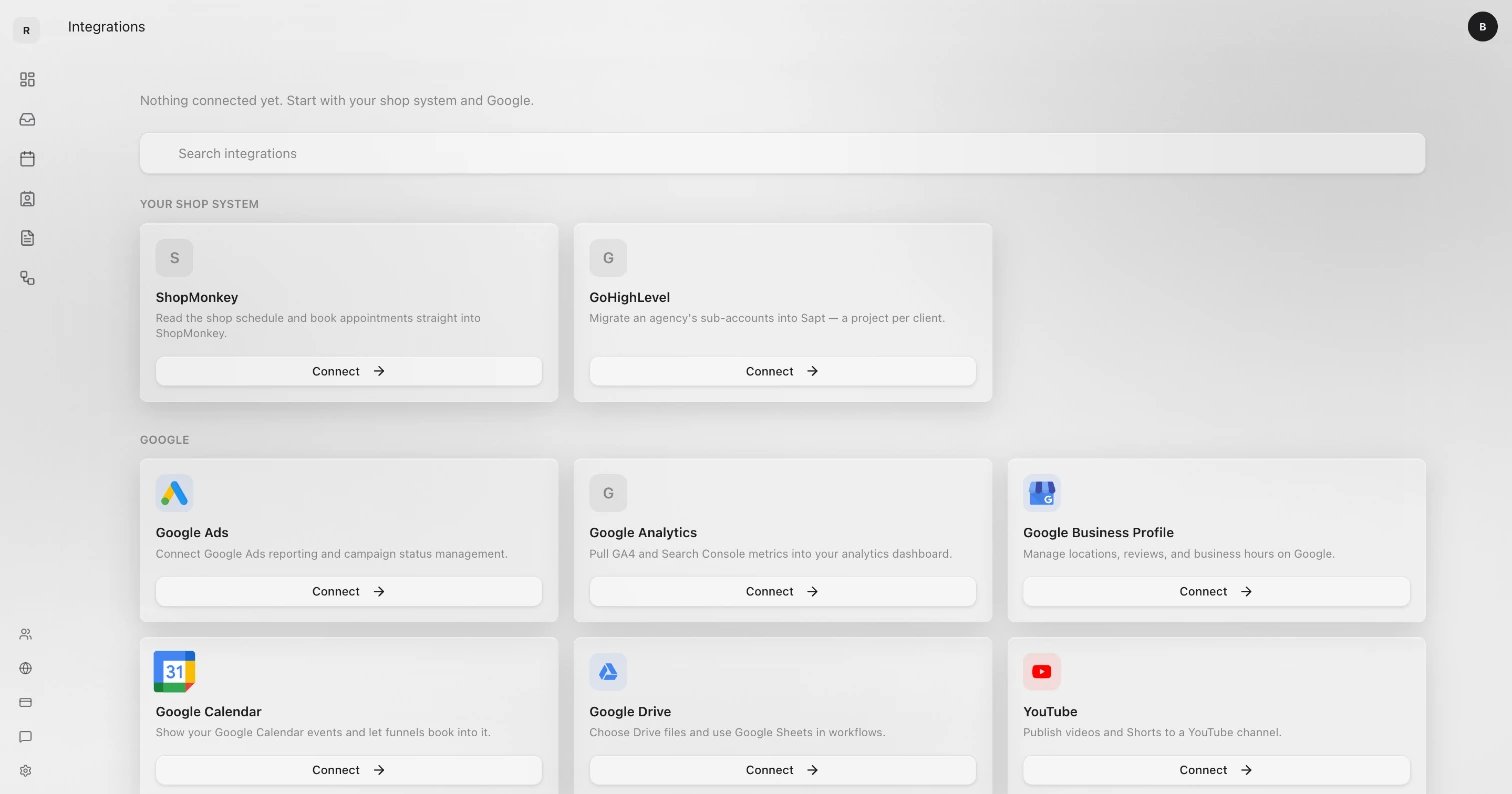
  <img src="https://mintcdn.com/sapt/xBY44wtgTzA0SZof/docs/mintlify/images/integrations/grid.webp?fit=max&auto=format&n=xBY44wtgTzA0SZof&q=85&s=573cd8644cef4028284c40bc82796263" alt="The top of the Integrations page: Search integrations, then ShopMonkey and GoHighLevel under Your shop system, then the Google apps, each with a Connect button" width="1512" height="794" data-path="docs/mintlify/images/integrations/grid.webp" />
</Frame>

## Where to find them

On the web, click **Project Settings** in the sidebar, then **Connected apps**. The same list is at [app.sapt.ai/integrations](https://app.sapt.ai/integrations), or press ⌘K (Ctrl+K on Windows) and type **Integrations**.

Apps are grouped under **Your shop system**, **Google**, **Money**, **Marketing** and **Other**, with connected apps first. Type in **Search integrations** to find one.

On your phone, the Sapt app connects Google only: open **Growth** and tap **Connect Google**. Connect everything else on the web.

A few connections live in other places: your phone line under **Project Settings**, **Phone**, Cloudflare under **Project Settings**, **Domains**, and Claude or ChatGPT under **Account**, **Connect**.

<Note>
  Connecting and disconnecting needs a Sapt role that can manage integrations. The project owner always can.
</Note>

## How connecting works

<Steps>
  <Step title="Open the app's page">
    Click **Connect** on the app's tile. Its page says what Sapt does with it.
  </Step>

  <Step title="Click Connect">
    Most apps open their own sign-in window. Sign in and allow what it asks. A few, like ShopMonkey, ask you to paste a key from that app instead. Each app's guide below shows where to get it.
  </Step>

  <Step title="Check it worked">
    The window says **Account Connected** and closes. The tile now says **Connected**.
  </Step>
</Steps>

<Tip>
  If no window opens, your browser blocked it. Allow pop-ups for app.sapt.ai and click **Connect** again.
</Tip>

### Connect a client's account

Agencies can let a client connect their own account. On the app's page, click **Send to client**, then **Copy**, and send the link. Your client signs in with their own account. They don't need a Sapt login. The link works until your client uses it, and the refresh button makes a new link and turns off the old one. This works for every app you connect by signing in.

If you run more than one Sapt project, **Import** copies a connection from another of your projects, so you don't sign in again.

## Keep it working

| The tile says | What it means |
| - | - |
| **Connected** | It works. |
| **Needs setup** | Something is saved, but it can't work yet. This is often a permission you left unticked. Open the page and click **Reconnect**, then allow everything. |
| **Reconnect required** | The connection expired. Click **Reconnect**. |
| **Sapt managed** | Sapt runs it for you. There is nothing to set up. |

On a connected app's page, the **...** menu has:

* **Add another account**: connect one more login, like a second Google account.
* **Reconnect**: sign in again. Apps with several accounts show **Reconnect all**.
* **Test connection**: check that the app still answers.
* **Disconnect**: stop Sapt using the app. Apps with several accounts show **Disconnect all**.

**Refresh accounts** picks up new Google locations or other new accounts without signing in again.

<Warning>
  **Disconnect** works the moment you click it. You can connect again any time.
</Warning>

<Note>
  Your account's **Connected Apps** tab is something else. It lists AI apps, like Claude or ChatGPT, signed in to your Sapt account.
</Note>

## Every integration

### Shop systems

<CardGroup cols={3}>
  <Card title="ShopMonkey" icon="https://mintcdn.com/sapt/uTSH2FdHG3EzpkYv/docs/mintlify/images/logos/shopmonkey.svg?fit=max&auto=format&n=uTSH2FdHG3EzpkYv&q=85&s=dafab35597278a2502c5b74944ec5922" href="/docs/mintlify/integrations/shopmonkey" horizontal width="55" height="55" data-path="docs/mintlify/images/logos/shopmonkey.svg" />
</CardGroup>

### Google

<CardGroup cols={3}>
  <Card title="Google Business Profile" icon="https://mintcdn.com/sapt/xBY44wtgTzA0SZof/docs/mintlify/images/logos/google-business-profile.svg?fit=max&auto=format&n=xBY44wtgTzA0SZof&q=85&s=a20444f32db15a5964f88e0b583c025f" href="/docs/mintlify/integrations/google-business-profile" horizontal width="200" height="200" data-path="docs/mintlify/images/logos/google-business-profile.svg" />

  <Card title="Google Ads" icon="https://mintcdn.com/sapt/xBY44wtgTzA0SZof/docs/mintlify/images/logos/google-ads.svg?fit=max&auto=format&n=xBY44wtgTzA0SZof&q=85&s=3f20e4632947341cf902c485ad0904db" href="/docs/mintlify/integrations/google-ads" horizontal width="200" height="200" data-path="docs/mintlify/images/logos/google-ads.svg" />

  <Card title="Google Analytics" icon="https://mintcdn.com/sapt/xBY44wtgTzA0SZof/docs/mintlify/images/logos/google-analytics.svg?fit=max&auto=format&n=xBY44wtgTzA0SZof&q=85&s=11c3fe276188cadad781b0eda9832824" href="/docs/mintlify/integrations/google-analytics" horizontal width="200" height="200" data-path="docs/mintlify/images/logos/google-analytics.svg" />

  <Card title="Google Calendar" icon="https://mintcdn.com/sapt/xBY44wtgTzA0SZof/docs/mintlify/images/logos/google-calendar.svg?fit=max&auto=format&n=xBY44wtgTzA0SZof&q=85&s=47782cd44416ebe97bd95bb850c8749e" href="/docs/mintlify/integrations/google-calendar" horizontal width="186" height="186" data-path="docs/mintlify/images/logos/google-calendar.svg" />

  <Card title="Google Drive" icon="https://mintcdn.com/sapt/xBY44wtgTzA0SZof/docs/mintlify/images/logos/google-drive.svg?fit=max&auto=format&n=xBY44wtgTzA0SZof&q=85&s=c3b5ff6a53e43b21797d2d7081c5bf55" href="/docs/mintlify/integrations/google-drive" horizontal width="189" height="189" data-path="docs/mintlify/images/logos/google-drive.svg" />

  <Card title="Gmail" icon="https://mintcdn.com/sapt/xBY44wtgTzA0SZof/docs/mintlify/images/logos/gmail.svg?fit=max&auto=format&n=xBY44wtgTzA0SZof&q=85&s=83c9211276bce6a8eddd29a44b7f5fa8" href="/docs/mintlify/integrations/gmail" horizontal width="200" height="200" data-path="docs/mintlify/images/logos/gmail.svg" />

  <Card title="YouTube" icon="https://mintcdn.com/sapt/uTSH2FdHG3EzpkYv/docs/mintlify/images/logos/youtube.svg?fit=max&auto=format&n=uTSH2FdHG3EzpkYv&q=85&s=5832fce266ea00900a3acd479795dbb1" href="/docs/mintlify/integrations/youtube" horizontal width="356" height="356" data-path="docs/mintlify/images/logos/youtube.svg" />
</CardGroup>

### Social and ads

<CardGroup cols={3}>
  <Card title="Meta" icon="https://mintcdn.com/sapt/xBY44wtgTzA0SZof/docs/mintlify/images/logos/meta.svg?fit=max&auto=format&n=xBY44wtgTzA0SZof&q=85&s=1412e89980680375696926ee9037c013" href="/docs/mintlify/integrations/meta" horizontal width="1711" height="1711" data-path="docs/mintlify/images/logos/meta.svg" />

  <Card title="TikTok" icon="https://mintcdn.com/sapt/uTSH2FdHG3EzpkYv/docs/mintlify/images/logos/tiktok.svg?fit=max&auto=format&n=uTSH2FdHG3EzpkYv&q=85&s=8c8a237db667f6ad36bacb51f8e1cd54" href="/docs/mintlify/integrations/tiktok" horizontal width="682" height="682" data-path="docs/mintlify/images/logos/tiktok.svg" />

  <Card title="TikTok Ads" icon="https://mintcdn.com/sapt/uTSH2FdHG3EzpkYv/docs/mintlify/images/logos/tiktok-ads.svg?fit=max&auto=format&n=uTSH2FdHG3EzpkYv&q=85&s=54041fefe2c34fe39ba5b640db31aee9" href="/docs/mintlify/integrations/tiktok-ads" horizontal width="682" height="682" data-path="docs/mintlify/images/logos/tiktok-ads.svg" />
</CardGroup>

### Messages and email

<CardGroup cols={3}>
  <Card title="WhatsApp" icon="https://mintcdn.com/sapt/uTSH2FdHG3EzpkYv/docs/mintlify/images/logos/whatsapp.svg?fit=max&auto=format&n=uTSH2FdHG3EzpkYv&q=85&s=356ef56f41485ca22dd278b42bce81e3" href="/docs/mintlify/integrations/whatsapp" horizontal width="818" height="818" data-path="docs/mintlify/images/logos/whatsapp.svg" />

  <Card title="Telnyx" icon="https://mintcdn.com/sapt/uTSH2FdHG3EzpkYv/docs/mintlify/images/logos/telnyx.svg?fit=max&auto=format&n=uTSH2FdHG3EzpkYv&q=85&s=7b497c3d833840f83b920b668b484f11" href="/docs/mintlify/integrations/telnyx" horizontal width="435" height="435" data-path="docs/mintlify/images/logos/telnyx.svg" />

  <Card title="Slack" icon="https://mintcdn.com/sapt/uTSH2FdHG3EzpkYv/docs/mintlify/images/logos/slack.svg?fit=max&auto=format&n=uTSH2FdHG3EzpkYv&q=85&s=63ecbb346995f750e733db510ed9bc20" href="/docs/mintlify/integrations/slack" horizontal width="143" height="143" data-path="docs/mintlify/images/logos/slack.svg" />

  <Card title="Zoho Mail" icon="https://mintcdn.com/sapt/uTSH2FdHG3EzpkYv/docs/mintlify/images/logos/zoho-mail.svg?fit=max&auto=format&n=uTSH2FdHG3EzpkYv&q=85&s=e80e9265e1da8d667670d0c85201e0d9" href="/docs/mintlify/integrations/zoho-mail" horizontal width="330" height="330" data-path="docs/mintlify/images/logos/zoho-mail.svg" />
</CardGroup>

### Calendars

<CardGroup cols={3}>
  <Card title="Cal.com" icon="https://mintcdn.com/sapt/xBY44wtgTzA0SZof/docs/mintlify/images/logos/cal-com.svg?fit=max&auto=format&n=xBY44wtgTzA0SZof&q=85&s=eeda089ce4d701985a223f6ee9a87449" href="/docs/mintlify/integrations/cal-com" horizontal width="455" height="455" data-path="docs/mintlify/images/logos/cal-com.svg" />

  <Card title="Calendly" icon="https://mintcdn.com/sapt/xBY44wtgTzA0SZof/docs/mintlify/images/logos/calendly.svg?fit=max&auto=format&n=xBY44wtgTzA0SZof&q=85&s=5bc0c540474fd07e58730aa3509f4551" href="/docs/mintlify/integrations/calendly" horizontal width="609" height="609" data-path="docs/mintlify/images/logos/calendly.svg" />
</CardGroup>

### CRMs

<CardGroup cols={3}>
  <Card title="HubSpot" icon="https://mintcdn.com/sapt/xBY44wtgTzA0SZof/docs/mintlify/images/logos/hubspot.svg?fit=max&auto=format&n=xBY44wtgTzA0SZof&q=85&s=338e2fe0bbb27f707f741f225930527b" href="/docs/mintlify/integrations/hubspot" horizontal width="27" height="27" data-path="docs/mintlify/images/logos/hubspot.svg" />

  <Card title="Close" icon="https://mintcdn.com/sapt/xBY44wtgTzA0SZof/docs/mintlify/images/logos/close.svg?fit=max&auto=format&n=xBY44wtgTzA0SZof&q=85&s=ed64ef3b4935070c7c9a63f7489a8ebd" href="/docs/mintlify/integrations/close" horizontal width="30" height="30" data-path="docs/mintlify/images/logos/close.svg" />

  <Card title="GoHighLevel" icon="https://mintcdn.com/sapt/xBY44wtgTzA0SZof/docs/mintlify/images/logos/gohighlevel.svg?fit=max&auto=format&n=xBY44wtgTzA0SZof&q=85&s=4460c3105a4a4d947269b2c388be1ab0" href="/docs/mintlify/integrations/gohighlevel" horizontal width="341" height="341" data-path="docs/mintlify/images/logos/gohighlevel.svg" />
</CardGroup>

### Payments

<CardGroup cols={3}>
  <Card title="Stripe" icon="https://mintcdn.com/sapt/uTSH2FdHG3EzpkYv/docs/mintlify/images/logos/stripe.svg?fit=max&auto=format&n=uTSH2FdHG3EzpkYv&q=85&s=242040077ec79253fb1d2e26a4c409bd" href="/docs/mintlify/integrations/stripe" horizontal width="582" height="582" data-path="docs/mintlify/images/logos/stripe.svg" />

  <Card title="Shopify" icon="https://mintcdn.com/sapt/uTSH2FdHG3EzpkYv/docs/mintlify/images/logos/shopify.svg?fit=max&auto=format&n=uTSH2FdHG3EzpkYv&q=85&s=0e2772c6e09fb587dfa089b7cf90c97e" href="/docs/mintlify/integrations/shopify" horizontal width="114" height="114" data-path="docs/mintlify/images/logos/shopify.svg" />

  <Card title="QuickBooks" icon="https://mintcdn.com/sapt/uTSH2FdHG3EzpkYv/docs/mintlify/images/logos/quickbooks.svg?fit=max&auto=format&n=uTSH2FdHG3EzpkYv&q=85&s=c1041fbd1c099f69106882298fbd1455" href="/docs/mintlify/integrations/quickbooks" horizontal width="70" height="70" data-path="docs/mintlify/images/logos/quickbooks.svg" />
</CardGroup>

### Domains

<CardGroup cols={3}>
  <Card title="Cloudflare" icon="https://mintcdn.com/sapt/xBY44wtgTzA0SZof/docs/mintlify/images/logos/cloudflare.svg?fit=max&auto=format&n=xBY44wtgTzA0SZof&q=85&s=ded6b16ecc845dab4338e39cf62f0937" href="/docs/mintlify/integrations/cloudflare" horizontal width="55" height="55" data-path="docs/mintlify/images/logos/cloudflare.svg" />
</CardGroup>

### AI and creative

<CardGroup cols={3}>
  <Card title="Claude and ChatGPT" icon="https://mintcdn.com/sapt/xBY44wtgTzA0SZof/docs/mintlify/images/logos/claude-and-chatgpt.svg?fit=max&auto=format&n=xBY44wtgTzA0SZof&q=85&s=ea2b1a7cd28a3aa7835550381f84addd" href="/docs/mintlify/integrations/claude-and-chatgpt" horizontal width="268" height="268" data-path="docs/mintlify/images/logos/claude-and-chatgpt.svg" />

  <Card title="Higgsfield" icon="https://mintcdn.com/sapt/xBY44wtgTzA0SZof/docs/mintlify/images/logos/higgsfield.png?fit=max&auto=format&n=xBY44wtgTzA0SZof&q=85&s=0995a11e500e956753c58529b4f5b02b" href="/docs/mintlify/integrations/higgsfield" horizontal width="512" height="512" data-path="docs/mintlify/images/logos/higgsfield.png" />

  <Card title="Content Rewards" icon="https://mintcdn.com/sapt/xBY44wtgTzA0SZof/docs/mintlify/images/logos/content-rewards.png?fit=max&auto=format&n=xBY44wtgTzA0SZof&q=85&s=7f9dc18632e5af05e4056096a28d9285" href="/docs/mintlify/integrations/content-rewards" horizontal width="512" height="512" data-path="docs/mintlify/images/logos/content-rewards.png" />

  <Card title="Whop" icon="https://mintcdn.com/sapt/uTSH2FdHG3EzpkYv/docs/mintlify/images/logos/whop.svg?fit=max&auto=format&n=uTSH2FdHG3EzpkYv&q=85&s=b1bf2a5722863a27f9f41c2d8e6a40d9" href="/docs/mintlify/integrations/whop" horizontal width="45" height="45" data-path="docs/mintlify/images/logos/whop.svg" />
</CardGroup>

Don't see the app you use? Tell us from **Support** in the sidebar.


This documentation is built and hosted on [Mintlify](https://mintlify.com), a developer documentation platform.