> ## Documentation Index
> Fetch the complete documentation index at: https://docs.sapt.ai/llms.txt
> Use this file to discover all available pages before exploring further.
# Connect Whop
> Link the Whop account you use for reward campaigns to your Sapt project. See what the connection does and what still happens in Whop.
Connecting Whop links the Whop account you use for reward campaigns to this Sapt project.
## What you get
* Your Whop sign-in saved for this project. Sapt keeps it fresh and shows your Whop name on the Whop card.
Today that is all the connection does.
## Before you start
* A Whop account.
* Allow pop-ups for app.sapt.ai. Whop opens in a small window.
## Connect Whop
In Sapt, open **Project Settings** and then **Connected apps**. Find **Whop** under **Money** and click **Connect**. On the Whop page, click **Connect** again.
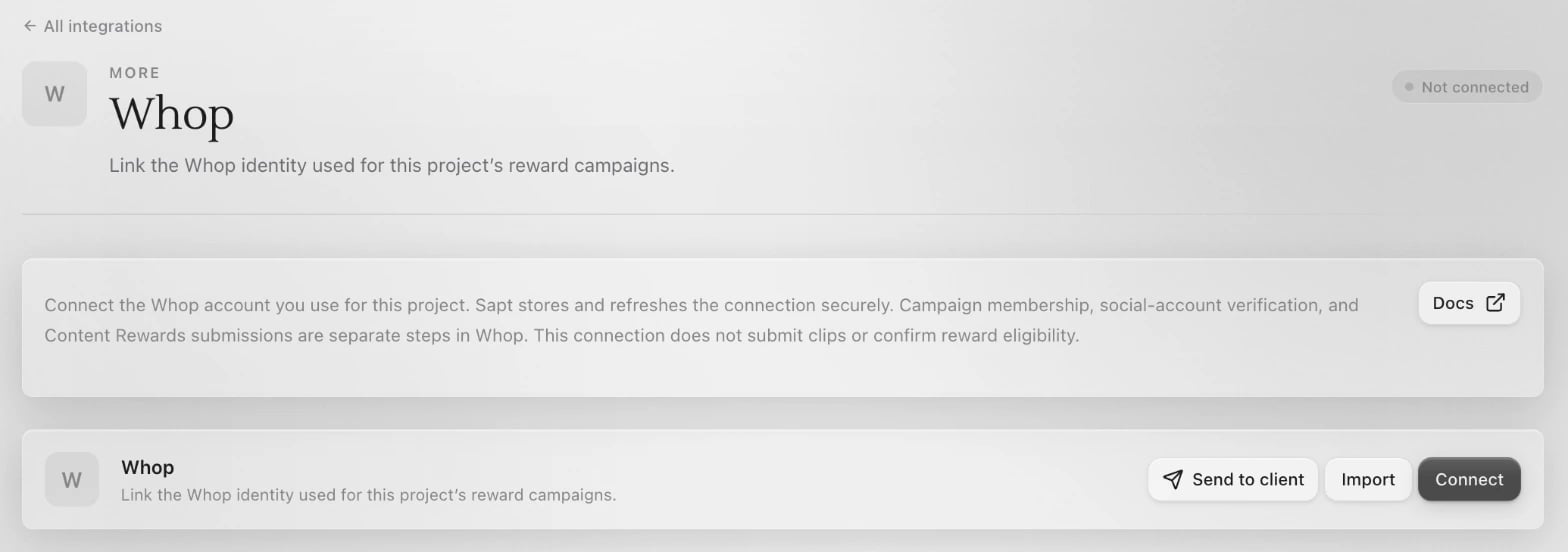 Sign in to Whop in the window that opens and approve Sapt.
Back in Sapt, the Whop card shows **Connected** with your Whop name.
## What Sapt does and does not do
* The connection does not submit clips or confirm that you earned a reward.
* Campaign membership, social-account checks and Content Rewards submissions are separate steps in Whop.
* To send clips to a campaign, connect [Content Rewards](/docs/mintlify/integrations/content-rewards).
## Disconnect
On the Whop page in Sapt, open the **...** menu on the Whop card and choose **Disconnect**. Sapt also asks Whop to end the sign-in.
## Keep going
Find campaigns and send your clips.
See what else you can connect.
This documentation is built and hosted on [Mintlify](https://mintlify.com), a developer documentation platform.
Sign in to Whop in the window that opens and approve Sapt.
Back in Sapt, the Whop card shows **Connected** with your Whop name.
## What Sapt does and does not do
* The connection does not submit clips or confirm that you earned a reward.
* Campaign membership, social-account checks and Content Rewards submissions are separate steps in Whop.
* To send clips to a campaign, connect [Content Rewards](/docs/mintlify/integrations/content-rewards).
## Disconnect
On the Whop page in Sapt, open the **...** menu on the Whop card and choose **Disconnect**. Sapt also asks Whop to end the sign-in.
## Keep going
Find campaigns and send your clips.
See what else you can connect.
This documentation is built and hosted on [Mintlify](https://mintlify.com), a developer documentation platform.